
The Complete Guide to PixAI Credit Packs & FAQs
Credits are the core resource within the PixAI platform used to perform various AI creation operations (such as image generation, model training, HD processing, etc.). To meet the diverse needs of users, PixAI offers several types of Credit Packs for purchase.
This guide aims to provide all PixAI users with a comprehensive overview of Credit Packs. It covers the classification of packs, purchase methods, exclusive member benefits, and answers to common questions. Through this guide, you can gain a clear understanding of the features and purchasing rules for different Credit Packs to optimize your credit acquisition and usage experience.
I. Classification of Credit Packs
Based on purchase limits and discount mechanisms, PixAI currently offers two core types of Credit Packs: Special Offer Packs and Regular Packs.
1. Special Offer Credit Packs
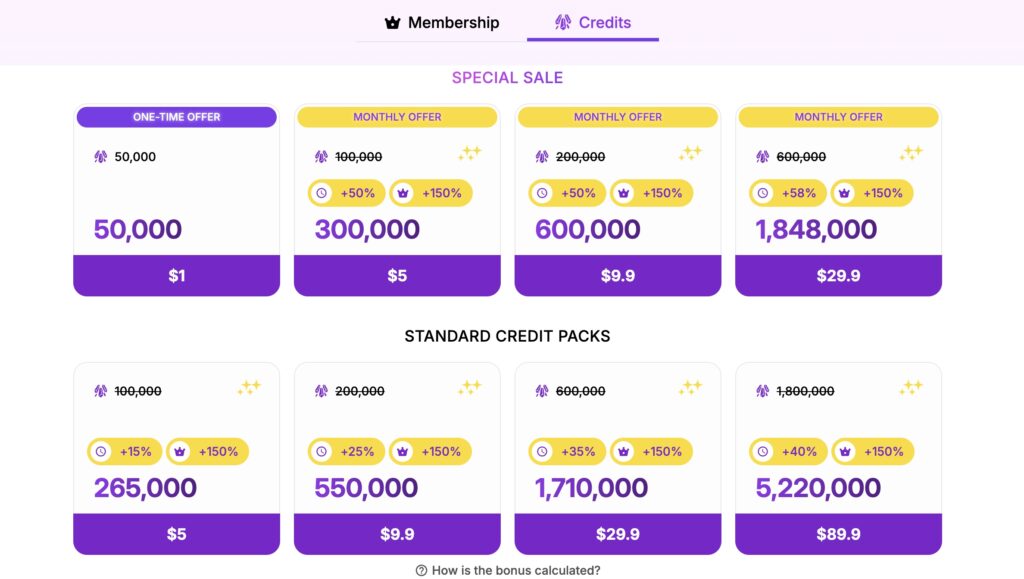
These packs typically offer bonus credits and have purchase restrictions.
Special Offer Packs are further divided into the following two types:
- ⚡ $1 One-Time Deal
This is a “welcome gift” or limited-time special offer prepared by PixAI for users.- Feature: Can be purchased only once.
- ⚠️ Note: Once purchased successfully, this option will disappear from your shop list and cannot be bought again.
- 📅 Monthly Deal
This is a top-up pack for maintaining daily creation, designed to provide you with periodic benefits.- Feature: Can be purchased only once per month.
- Refresh Mechanism: After purchase, you must wait until the following month (typically at the beginning of the month in server time) to become eligible to purchase it again.
2. Regular Credit Packs
This is the most standard replenishment option, designed to meet your credit needs at any time.
- Feature: No purchase limit.
- Advantage: You can freely purchase these whenever you need to top up credits, without restrictions based on cycles or purchase history. They are suitable for high-intensity creators.
💡Important Note Regarding Discount Campaigns
During PixAI promotional campaigns (e.g., holiday sales), some Credit Packs may offer additional bonus credits. Please be aware:
- Only “Regular Credit Packs” participate in these additional bonus campaigns.
- “Special Offer Credit Packs”, as they already include a high credit bonus, typically do not participate in extra bonus campaigns.
II. Purchasing Credit Packs
PixAI offers flexible multi-platform top-up channels. You can easily purchase credits through the Web platform or the Mobile App (iOS & Android), depending on your current device preference.
1. Web
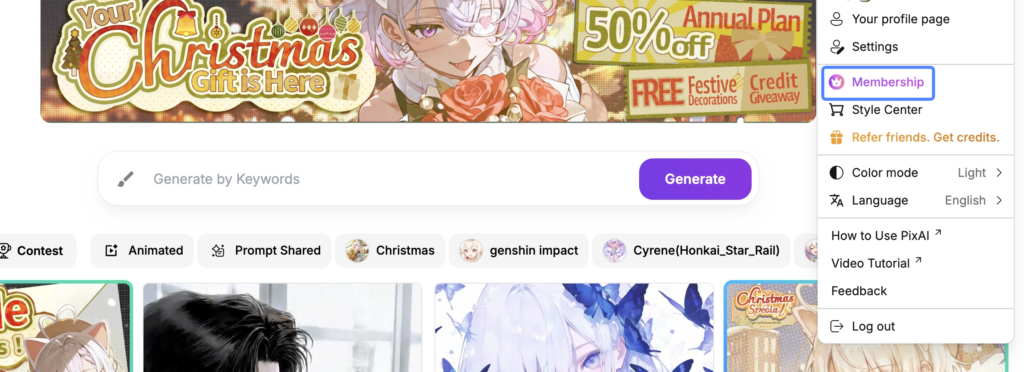
- Click the avatar in the top right corner ➡️ Membership Plan
- Select 【Credits】 to start shopping.
2. Mobile App
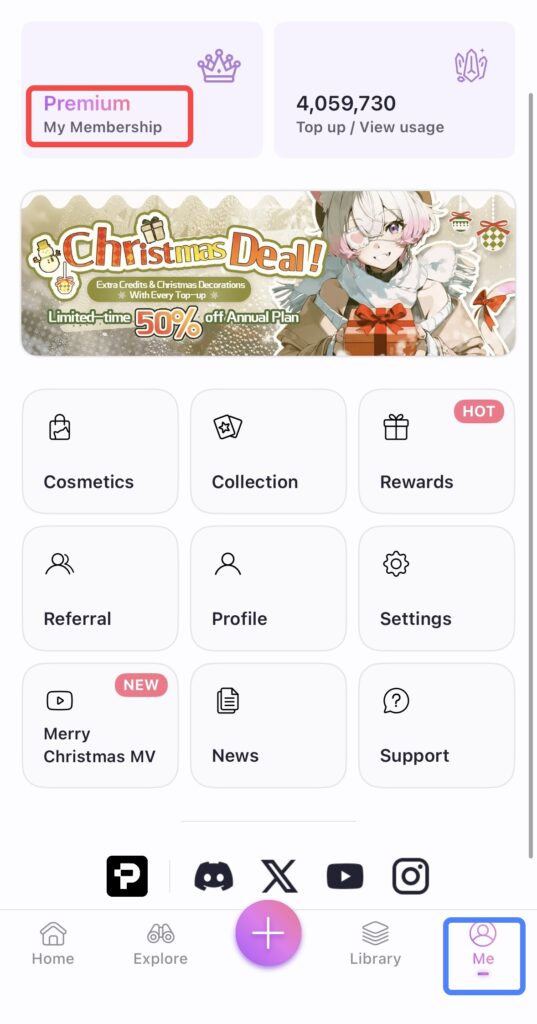
- Tap Me ➡️ My Membership Plan
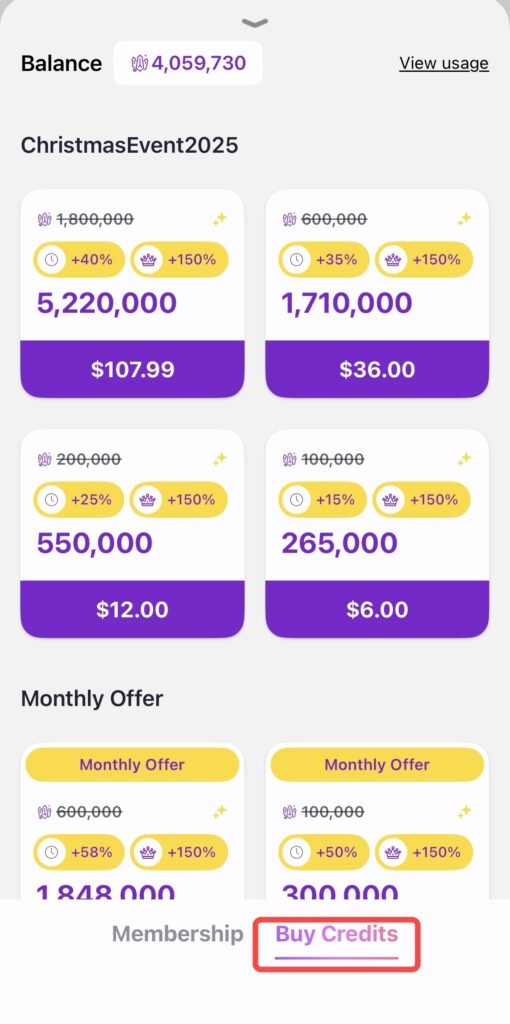
- Select 【Buy Credits】 to start shopping.
III. Member Benefits for Credit Packs
When you upgrade to different membership tiers, every purchase of a Credit Pack will grant you additional bonus credits. The higher your membership tier, the greater the bonus percentage.
| Membership Tier | Credit Bonus Percentage | Actual Result (for a purchase of 10,000 Credits) |
|---|---|---|
| Starter | Extra +50% | Receive 15,000 Credits (5,000 extra credits) |
| Plus | Extra +100% | Receive 20,000 Credits (10,000 extra credits) |
| Premium | Extra +150% | Receive 25,000 Credits (15,000 extra credits) |
🌟 Core Advantage: The member bonus applies to all eligible Credit Pack purchases, with no limit on the total number of purchases or total amount spent.
❓ Frequently Asked Questions (FAQ)
Q1: Do Credit Packs have an expiration date?
A: No. The credits you purchase or receive do not have an expiration date and can be used freely at any time.
Q2: Can I get a refund for a purchased Credit Pack?
A: PixAI generally does not offer refunds after a payment is completed.
This policy is based on the PixAI Terms of Service .
If this outcome does not meet your expectations, we sincerely apologize and appreciate your understanding.
Q3: What should I do if I purchased a Credit Pack but didn’t receive the credits?
A: Please check the following steps:
- Check your invoice or receipt email to confirm if the order was completed successfully.
- If payment was successful but you still haven’t received the credits, please provide the following information to our customer service team for assistance:
- Order Screenshot
- Order Number (iOS orders typically start with ‘M’; Google Play orders typically start with ‘GPA.’)
The customer service team will help verify the order status and issue the corresponding credits.
Q4: Can discount campaigns and member bonuses be stacked?
A: Yes, in most cases, member bonuses and campaign discounts can be stacked, allowing you to get the maximum value from your top-up.
PixAI’s credit bonus mechanism is designed to encourage users to upgrade their membership, so member benefits typically take effect alongside periodic promotional campaigns.
Detailed Stacking Explanation:
- When Stacking Applies:
- Monthly Deal Pack: When purchasing the “Monthly Deal” Credit Pack (limited to one per month), its own high discount can be stacked with your membership tier bonus (e.g., Starter +50%).
- Campaign Packs: “Regular Credit Packs” that participate in limited-time campaign bonuses can also be stacked with member bonuses.
- Calculation Basis: Please note that all extra bonus credits are calculated based on the pack’s original base credit amount, not on the discounted price or the final total credit amount.
- Example: Suppose you purchase a Credit Pack with a base amount of 10,000 credits, and you are a Plus member (+100% bonus). If there is an ongoing campaign offering an extra 20% bonus, you would receive:
10,000 + (10,000 * 100%) + (10,000 * 20%) = 22,000 credits.
- Example: Suppose you purchase a Credit Pack with a base amount of 10,000 credits, and you are a Plus member (+100% bonus). If there is an ongoing campaign offering an extra 20% bonus, you would receive:
Related Guides


