
OpenArt Review: Is It Worth Using for Anime Art in 2026?

OpenArt is one of the most ambitious AI platforms around right now. It is not a single image generator but a full creation studio that covers image, video, voice, 3D worlds and chat-based storytelling, and it runs on a roster of premium models like Veo, Sora, Seedance and Nano Banana.
OpenArt says it is used by major brands and millions of creators, and that scale is part of why so many people are searching for an honest review before they pay for it.
I went in as an anime creator and tested it firsthand rather than reading the feature list. I ran three deliberately demanding prompts, watched where it held up and where it struggled, and kept asking one question the marketing never answers directly: how well does a generalist cinematic platform actually handle traditional anime illustration and a recurring character.
This review is what I found.
Table of Contents
What OpenArt actually is
Before the testing, it helps to set expectations, because OpenArt is not built the way an anime generator is. Image generation is only one part of a much larger platform. The focus is video and storytelling, and that shapes everything. The Director feature turns a chat conversation into a multi-shot video, Worlds builds navigable 3D environments, and the Audio tools add voiceover, music and lip sync.

For that kind of end-to-end production, especially brand content, UGC ads and AI-influencer work, OpenArt is capable, and I want to be clear about that before I get into where it struggled for me.
The features that define it
You could list OpenArt features for a long time, so I want to focus on what makes it what it is. The platform pulls together a remarkable range under one login.
At the center is video and storytelling. The Director lets you direct a video by chatting, the premium video models cover cinematic generation up to several seconds long, and Worlds and Audio extend that into 3D environments and full soundtracks.
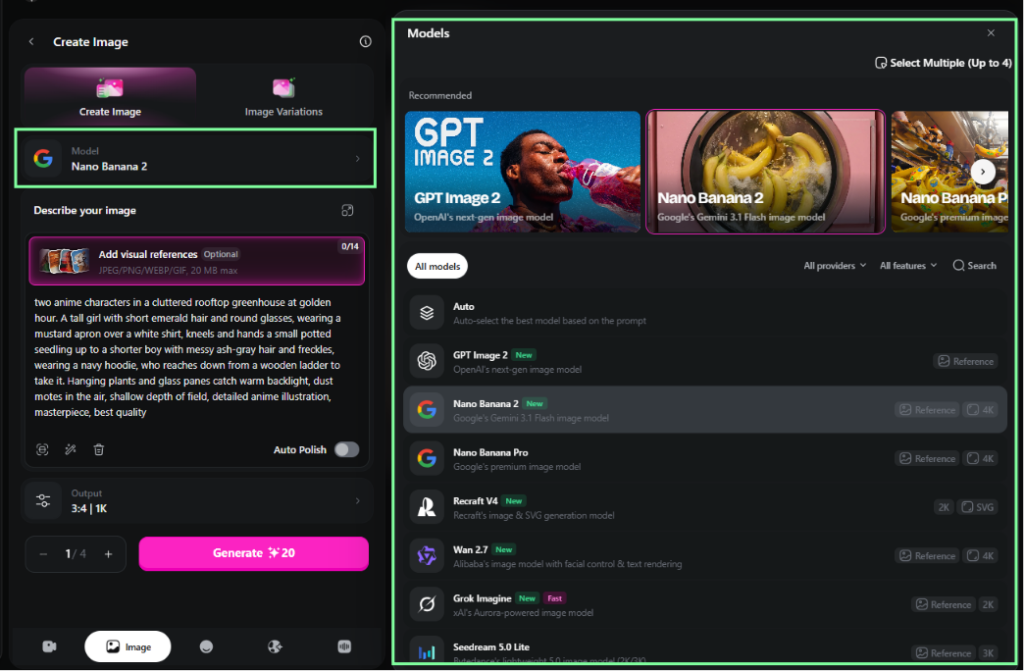
On the image side, OpenArt offers more than a dozen image models, including GPT Image 2, Nano Banana 2 and Nano Banana Pro, Seedream, Recraft V4, Wan 2.7 and Qwen Image 2, and it lets you train your own personalized models. The important thing to notice is that these image models are powerful generalists rather than anime-tuned engines, which matters once you start asking for a specific anime look. The video and storytelling side is where OpenArt clearly leads, and it deserves credit for that.
Hands-on: how OpenArt handled my prompts
Features only tell you so much, so I ran three prompts designed to stress the things that actually decide anime work: dense attribute adherence, character consistency across edits, and compositional control. I used OpenArt’s Nano Banana 2 for the image work, since it is one of its stronger image models, and ran each prompt cold.
Test 1: a dense single character with in-image text
This prompt stacks more than a dozen specific constraints on one figure, plus a title rendered inside the image, so it tests detail adherence, anime fidelity and text rendering at once.
Prompt: anime light novel cover illustration, a young sorceress with waist-length lavender hair in a high ponytail, undercut on the right side, golden slit-pupil eyes, a crescent-moon brand on her left cheek, layered midnight-blue robe with silver astrological embroidery and a high collar, fingerless gloves, levitating three glowing rune-stones above her open palm, standing on a cracked floating island at dusk, distant waterfalls falling into open sky, volumetric god rays, cinematic rim light, the title text “ASTRAL VANGUARD” in clean stylized serif lettering across the top, detailed anime illustration, masterpiece, best quality
And, here is the result:

OpenArt (Nano Banana 2), Test 1 result
OpenArt got the scene right. The light-novel cover framing, the lavender high ponytail, the midnight-blue robe with silver astrological embroidery and a high collar, the three glowing rune-stones in the correct count, the cracked floating island at dusk, the distant waterfalls into open sky and the volumetric god rays all landed. The title text came out clean and correctly spelled in a stylized serif, which many models still get wrong.
The character details were a different story. It ignored the right-side undercut entirely, rendered the eyes with a gold iris but no slit pupil, and the raised hand reads as a full glove rather than the fingerless ones I asked for.
The crescent-moon cheek brand came out as a vague marking rather than a clean crescent. It also added cover elements I never prompted, including a “volume 1” label and an author byline, which means some of what looks finished is the model filling gaps rather than following the brief.
On style, the render sat in semi-real painterly territory, with soft photographic shading on the skin and the haze, rather than flat cel anime. A competent, sellable cover image that nailed the scene but dropped several explicit character details and drifted off traditional anime.
Test 2: holding one character across edits
This is the test that matters most for anyone building a recurring character, so I generated a specific original character and then pushed her through two transformations to watch for drift.
Prompt: 1girl, original character, asymmetrical silver bob with one braided strand, heterochromia (left eye amber, right eye violet), small beauty mark under the left eye, teal-gem choker, oversized charcoal bomber jacket over a white crop top, upper body, looking at viewer, soft studio lighting, detailed anime illustration, masterpiece, best quality
Result:

OpenArt, Test 2 base character
The base came out well. The silver asymmetrical bob with the single braided strand, the amber and violet eyes, the teal-gem choker, and the charcoal bomber over a white crop top all landed, though the style again carried that soft semi-real shading. Then I changed the scene.
Prompt: same character, laughing with eyes closed, extreme close-up of the face from a low three-quarter angle, soft bokeh background
And, the result is:

OpenArt, Test 2 transform (A)
The expression and the soft background came through cleanly, and the choker, beauty mark, and single braided strand all held. Two things slipped. The low three-quarter angle did not arrive, since the shot reads as a slight tilt rather than a camera looking up, and the overall design softened slightly between renders, though the core identifying features remained intact.
Prompt: same character, wearing a cream knit sweater and plaid skirt, browsing books in a sunlit secondhand bookstore, full body, warm afternoon light
Result:

OpenArt, Test 2 transform (B)
The new outfit and environment were strong. The cream knit sweater, the plaid skirt, the full-body framing and the sunlit secondhand bookstore in warm afternoon light all arrived cleanly.
But this is where consistency broke. The model kept the braided hairstyle but duplicated the single braided strand into two braids, and it replaced the choker’s faceted teal gem with a plain dark band.
Across two consecutive transforms, the model altered multiple defining character details instead of preserving the original design, which is a real consistency issue rather than a one-off render.
Test 3: a two-character interaction
The third prompt pushed compositional control, with two characters, contrasting designs and a specific physical interaction between them.
Prompt: two anime characters in a cluttered rooftop greenhouse at golden hour. A tall girl with short emerald hair and round glasses, wearing a mustard apron over a white shirt, kneels and hands a small potted seedling up to a shorter boy with messy ash-gray hair and freckles, wearing a navy hoodie, who reaches down from a wooden ladder to take it. Hanging plants and glass panes catch warm backlight, dust motes in the air, shallow depth of field, detailed anime illustration, masterpiece, best quality
Result:

OpenArt, Test 3 result
OpenArt got both designs right, with the emerald-haired girl in round glasses and a mustard apron, and the freckled, ash-gray-haired boy in a navy hoodie. The wooden ladder came through clearly, more legible than I expected, and the greenhouse was a real strength, with visible roof beams, layered hanging plants and warm golden-hour light through the glass.
So, two things came up short. The spatial hierarchy I asked for, the boy elevated and reaching down to the girl, flattened into the two meeting at roughly the same height, and the dust motes and shallow depth of field did not appear.
The larger issue was style. This render drifted toward Western cartoon, with thick uniform linework, flat block shading and simplified facial proportions, which is a different direction from the semi-real drift in the first two tests but still a clear miss for an explicit anime illustration brief.
What the testing told me
Across the three tests, a consistent picture formed. OpenArt is strong on scene construction, environments, atmosphere and in-image text, and it followed the broad strokes of every prompt.
Two patterns worked against it for anime specifically. First, the aesthetic kept drifting off traditional anime, toward soft semi-real in the first two tests and toward Western cartoon in the third. Second, character consistency eroded across edits, with the braid and choker details degrading over just two transforms.
For a single hero image, OpenArt performs well. For a recurring anime character, that drift is the part to watch.
The credit system and what it costs
OpenArt runs on a credit system, and how those credits work matters just as much as the monthly price.
The free tier is fairly limited. New accounts get around 40 one-time trial credits, and since one image used about 20 credits in my testing, that gives you only a couple of generations before you have to decide whether to subscribe. Unused subscription credits also do not roll over, so they reset at the end of each billing cycle.
Paid plans start with Essential ($14 a month, or about $7 a month if billed annually) and include 4,000 credits. Above that are Advanced ($29, or about $14.50 annually) with 12,000 credits, Infinite ($56, or about $28 annually) with 24,000 credits, and Wonder for high-volume users.
One thing to keep in mind is that the Essential plan does not include commercial rights. Those start with the Advanced plan, so if you plan to sell your work or use it commercially, Advanced is really the entry point.
Pros and cons
After real use, here is how OpenArt stacks up. Its strengths come from range and production depth.
- Genuine all-in-one production, with image, video, 3D worlds and audio in one place.
- Access to premium models like Veo, Sora, Seedance and Nano Banana under one subscription.
- Strong scene construction, environment detail and atmosphere.
- Reliable in-image text rendering.
- Personalized model training and a chat-driven Director for video storytelling.
The weaker points cluster around anime work and the economics.
- The image output drifts off traditional anime, toward either semi-real or Western cartoon.
- Character consistency erodes across edits, which hurts recurring-character projects.
- A very thin one-time free trial and credits that do not roll over.
- Commercial rights gated to the Advanced tier and above.
- Premium video and high-resolution work burn credits quickly.
Who OpenArt is for, and who may struggle
No platform fits everyone, so it comes down to matching the tool to your work. OpenArt rewards a particular kind of creator.
It suits people whose work is video-first and story-first: brand campaigns, UGC ads, AI influencers, short-form social video and multi-scene storytelling. If you want one platform to take an idea all the way to a finished cinematic clip with voice and music, OpenArt covers that ground well, and the premium model access is real value for that audience.
The creators who may struggle are anime illustrators and original-character builders. The aesthetic drift means you spend effort pulling outputs back toward a true anime look, the consistency erosion makes a recurring OC harder to hold together, and the thin free trial leaves little room to test before paying.
Where a different workflow fits better
If your focus is anime illustration and recurring characters, a specialist tool is worth considering. For comparison, I ran the same three prompts through PixAI, an anime-first platform, using its Tsubaki.2 model for base prompt and Reference Pro for the consistency test.

The clearest difference showed up in the consistency test, the one OpenArt struggled with. PixAI’s base character held the same defining details, the silver bob with a single braid, the amber and violet eyes and the teal-gem choker, rendered in a crisper, more traditional cel-anime style. It was not flawless, since it rendered the charcoal bomber as a glossy black leather jacket, a clear material and color miss, and it added a small unprompted necklace.
But through both transformations, the laughing close-up and the bookstore outfit change, the braid and the heterochromia survived intact. Where OpenArt lost the braid and the choker gem across the same two steps, PixAI kept the character recognizable.

PixAI, Test 2 base character + transform (laughing close-up) + transform (bookstore outfit)
For OC, VTuber and series work, that retention matters most. PixAI reaches it through Reference Pro, a one-click feature where you upload a reference and choose what to keep, which is explained in the PixAI Edit Pro guide. For a character you want pinned down exactly, you can also train a Character LoRA so the design lives in the model itself, covered in the train LoRA on PixAI guide.
The other two tests traded strengths in interesting ways. On the dense cover prompt, PixAI held the anime look far better, with crisp linework and cel-style highlights instead of semi-real shading, and it nailed more of the fine character details, including a clean crescent-moon brand, legible fingerless gloves and more precise embroidery. Its weakness was composition, since it cropped the scene to a portrait and lost the floating-island staging the prompt centered on, and the title text was partly hidden behind hair strands.
So OpenArt kept the full cover scene while PixAI kept the anime style, with each missing what the other caught.

PixAI (Tsubaki.2), Test 1
The greenhouse scene came out close on the interaction itself. Both tools placed the ladder and the handoff gesture, and both softened the exact “boy above, reaching down” hierarchy into a level meeting, so neither fully delivered the relational spec.
OpenArt built the more detailed greenhouse, while PixAI kept the dust motes, the shallow depth of field and, more importantly, the traditional anime rendering that OpenArt’s cartoon drift gave up. It is worth noting that both tools also missed the low camera angle in the close-up earlier, so that is a shared limitation rather than a mark against one.

PixAI (Tsubaki.2), Test 3
Beyond the images, a few structural differences matter for anime creators. PixAI is anime-native, with models like Tsubaki.2 built for the style and a large community library of models and LoRAs to build from. Its economics also run the opposite way from OpenArt’s.
The free tier gives 10,000 daily credits that accumulate instead of expiring, commercial use is included, and paid plans run from $7.99 to $35.99 a month on annual billing with free monthly LoRA training slots, all laid out in the PixAI membership guide. If you are starting out, the how to use PixAI guide covers the basics quickly.
Helping you decide
Neither platform is the right choice for everyone. It really depends on the kind of work you want to do.
Stick with OpenArt if your work is video and storytelling first. For brand content, UGC ads, AI influencers and multi-scene cinematic video with voice and music, it is a strong, consolidated studio, and the premium model access is hard to match in a single subscription. Just go in knowing that the anime image output drifts off-style, character consistency wanders across edits, and the real entry price for commercial work is the Advanced tier.
Consider PixAI if your focus is anime illustration and recurring characters. In my tests it held the anime aesthetic and the character’s identity more reliably, and its free, accumulating credits and included commercial use make it easier to start without committing money up front. The PixAI sign-up guide walks through getting started.
After testing both, I came away feeling that they are built for different kinds of creators. OpenArt is an all-in-one creative platform that includes anime among many other styles. PixAI is built specifically for anime, and that focus shows when you’re trying to create and maintain the same character across multiple scenes.
If you want to see how your own character holds up across different scenes, you can try PixAI for free and test it with Reference Pro or a Character LoRA.


